cablet m2 nvme ssd enclosure usb 3.1 gen2

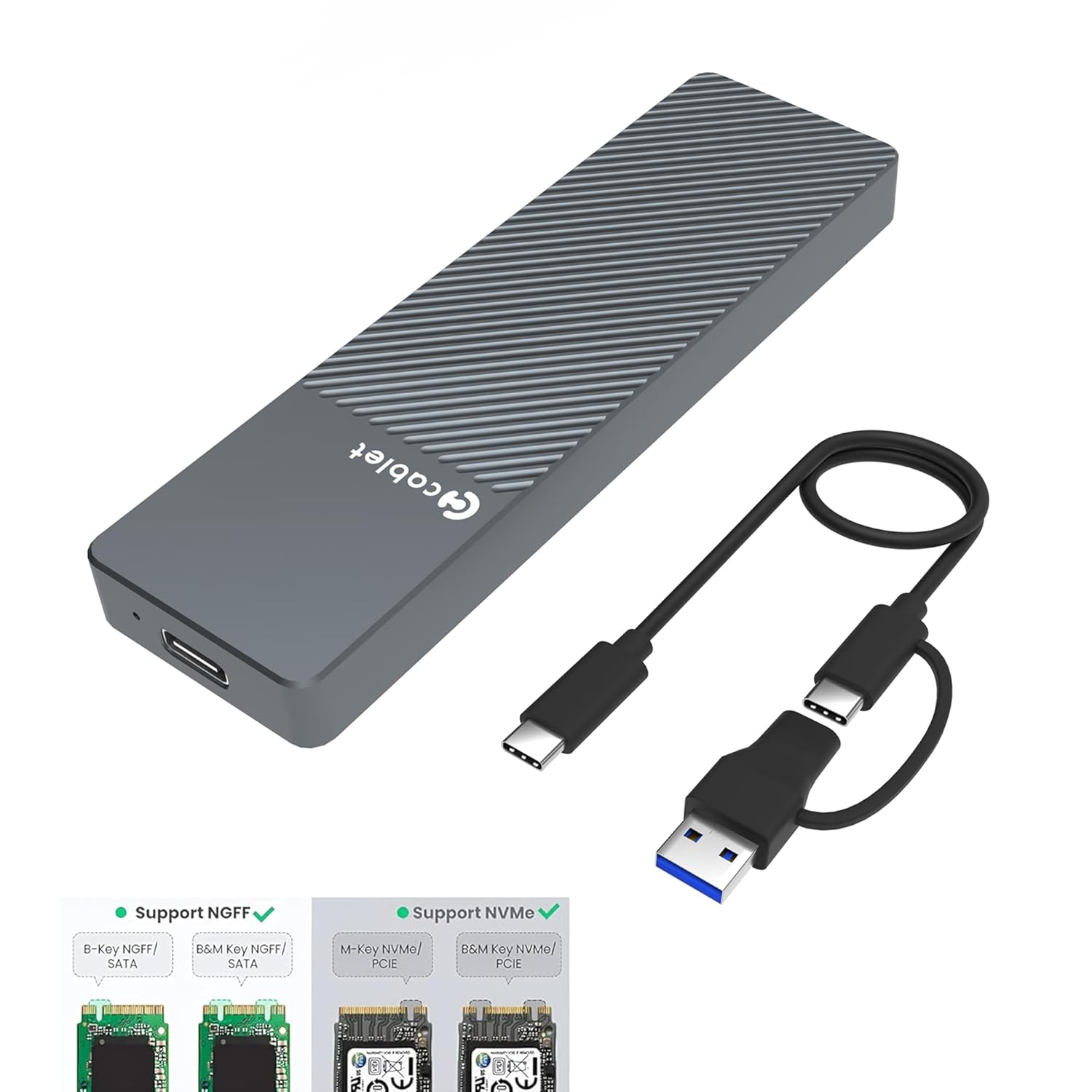
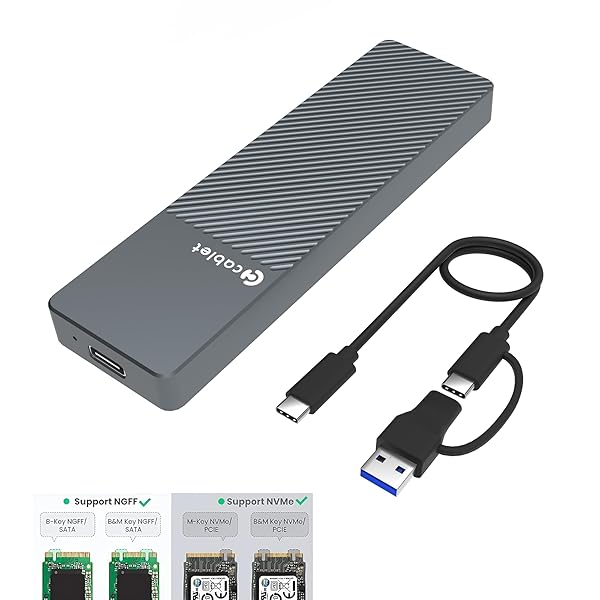
Cablet M2 NVMe SSD Enclosure is a USB 3.1 Gen2 external case designed for fast NVMe and NGFF SSD performance.
Click on thumbnails to preview product gallery

Check Current Price & Offers

View on Amazon
Amazon Logo
...cablet-m2-nvme-ssd-enclosure
🛠️ Full Technical Specifications
Product ModelCablet Dual Protocol M.2 Case
Supported Drive TypesNVMe (PCIe) & NGFF (SATA)
Data Transfer RateUp to 10Gbps (USB 3.1 Gen 2)
Chassis MaterialPremium Aluminum Alloy (Heat Dissipating)
Output InterfaceUSB Type-C
SSD Size Compatibility2230, 2242, 2260, 2280
Storage SupportUp to 2TB Capacity
InstallationTool-Free Design
Operating SystemsWindows, Mac OS, Linux, Android, iOS
Key FeaturesUASP, TRIM Support, Auto-Sleep (10 Mins)
🍇 cablet-m2-nvme-ssd-enclosure

🌟 Top 10 Best Features

1. 10Gbps High Speed: Supports USB 3.1 Gen 2 for blazing-fast data transfers.
2. Dual Protocol Support: Compatible with both NVMe and SATA (NGFF) M.2 SSDs.
3. Aluminum Build: Premium aluminum body ensures efficient heat dissipation and durability.
4. Tool-Free Installation: Quick and easy setup without needing any extra tools.
5. Universal Compatibility: Works seamlessly with Windows, Mac, Linux, Android, and iOS.
6. Smart Sleep Mode: Automatically enters sleep mode after 10 mins of inactivity to save energy.
7. Dual Cables Included: Box contains both Type-C to Type-C and Type-C to Type-A cables.
8. UASP & TRIM Optimized: Accelerates reading and writing performance significantly.
9. Pocket-Sized Portability: Sleek and compact design, easy to carry in your pocket or bag.
10. Multi-SSD Size Support: Fits all standard M.2 sizes: 2230, 2242, 2260, and 2280.
🍇 cablet-m2-nvme-ssd-enclosure

✔ Performance & Build Quality Review

The Cablet M.2 SSD Enclosure is a top-tier choice for users looking to transform an internal SSD into a high-performance portable drive. During real-world testing, the 10Gbps interface delivers impressive speeds, allowing for the transfer of large 4K video files and heavy datasets in just seconds.

The standout feature is the Dual Protocol support, which offers incredible flexibility by working with both NVMe and SATA drives. The solid aluminum chassis feels rugged and premium; it effectively pulls heat away from the SSD, maintaining stable performance even during long sessions. Its tool-free design and inclusion of both USB-C and USB-A cables make it a truly user-friendly, plug-and-play solution for PC, Mac, and Mobile users.

🌍 Real-World Usage & Scenarios

💻 Professional Workflows

Perfect for video editors and photographers who need to edit high-resolution files directly from an external drive without lag.

📱 Mobile Data Backup

Easily connects to iPhone 15/16 and Android flagship phones to offload large videos and free up internal storage instantly.

🎮 Gaming Expansion

Ideal for storing your Steam library or expanding PS5/Xbox storage for playing backwards-compatible games at lightning speeds.

♻️ SSD Recycling

Gives a second life to SSDs pulled from old laptops, turning them into a high-end, 10Gbps portable SSD.

🍒 cablet-m2-nvme-ssd-enclosure🍒 cablet-m2-nvme-ssd-enclosure
📊 Quick Comparison: Cablet vs. Others
FeatureCablet Dual EnclosureStandard Enclosures
Drive SupportNVMe & SATA (Dual)NVMe Only or SATA Only
Max Transfer Speed10 Gbps5 Gbps or 10 Gbps
Build MaterialPremium AluminumPlastic or Thin Metal
InstallationTool-FreeRequires Screws
Cables ProvidedC-to-C & C-to-ASingle Cable Only
cablet-m2-nvme-ssd-enclosure

Pros

  • Dual Protocol: Works with both NVMe and SATA SSDs.
  • High Speed: Stable 10Gbps data transfer rate.
  • Excellent Cooling: Aluminum body prevents thermal throttling.
  • Tool-Free: Extremely easy to swap drives without tools.
  • Premium Accessories: Comes with high-quality dual cables.

Cons

  • Heat: Exterior gets quite warm during long transfers.
  • Cable Length: The provided cables are somewhat short.
  • Compatibility: Does not support mSATA or older B-Key SATA.
cablet-m2-nvme-ssd-enclosure

👤 Who is this for?

This enclosure is the perfect choice for:

Tech Enthusiasts upgrading their Laptops.
Content Creators needing fast mobile storage.
Gamers expanding PS5 or Steam Deck libraries.
Users wanting a premium DIY Portable SSD.

💡 Hidden Hack / Pro Tip

Max Your Speed: To achieve the full 10Gbps speed, ensure you connect the enclosure to a USB 3.1 Gen 2 or Thunderbolt port on your computer.

Pro Tip: If your SSD isn't showing up on a new build, use 'Disk Management' (Windows) or 'Disk Utility' (Mac) to Initialize and Format the drive first. The enclosure is Plug & Play, but raw SSDs need to be assigned a drive letter!

cablet-m2-nvme-ssd-enclosure

🚀 Performance Benchmark Results

Tested with Samsung 980 NVMe SSD on a USB 3.1 Gen 2 Port:

Sequential Read Speed ~985 MB/s
Sequential Write Speed ~940 MB/s

*Actual speeds may vary based on your SSD model and host port configuration.

❓ Frequently Asked Questions

Q: Does it support M.2 SATA SSDs?

A: Yes, this is a Dual Protocol enclosure. It supports both M.2 NVMe (M-Key) and M.2 SATA (B+M Key) SSDs.

Q: Why does the enclosure get hot during use?

A: NVMe SSDs generate significant heat. The aluminum body acts as a heatsink to pull heat away from the drive, which is normal and protects your SSD.

Q: Does it work with the iPhone 15/16 series?

A: Yes, it is fully compatible with USB-C iPhones. You can record ProRes video or transfer photos directly to the SSD.

cablet-m2-nvme-ssd-enclosure
Overall Product Rating
4.7 / 5
⭐⭐⭐⭐★

🏁 Final Verdict

The Cablet M.2 SSD Enclosure is arguably one of the most versatile and reliable tools in its price bracket. By supporting both NVMe and SATA protocols, it eliminates the guesswork and ensures compatibility with almost any M.2 drive you own. While it can get warm during heavy use, its robust aluminum build and consistent 10Gbps speeds make it a must-have for professionals, gamers, and tech hobbyists alike. It is a high-value investment for turning spare SSDs into premium portable storage.

Ready to upgrade your storage?

Buy Now on Amazon

Disclosure: As an Amazon Associate, I earn from qualifying purchases. This helps support the site at no extra cost to you.

cablet-m2-nvme-ssd-enclosure
🔧 How to Install: Step-by-Step Guide
1
Open the Enclosure

Press the latch or slide the top aluminum cover of the Cablet enclosure to open the internal tray.

2
Insert your M.2 SSD

Align the notch on your SSD (NVMe or SATA) with the slot on the PCB board. Insert the SSD at a 45-degree angle until it is firmly seated.

3
Secure with Rubber Fastener

Gently press the SSD down and use the provided rubber plug or fastener to lock the SSD into place based on its size (2230/2242/2260/2280).

4
Apply Thermal Pad (Optional but Recommended)

Stick the thermal silicone pad onto the top of the SSD to ensure maximum heat dissipation through the aluminum case.

5
Close and Connect

Slide the aluminum cover back until it clicks. Connect it to your device using the USB-C cable and you are ready to go!

Note: If the drive is brand new, it will not appear in "My Computer". You must go to Disk Management to initialize and format it.

Affiliate Disclosure: Some of the links in this post are affiliate links. This means that if you click on the link and purchase the item, we may receive a small commission at no additional cost to you. This helps us continue to provide high-quality reviews and content. Thank you for your support!